I had a very strange problem when firewalld was used with nftables as the back end – rules configured properly in firewalld didn’t exist in the nftables rulesets so … didn’t exist. The most obvious failure in the k8s cluster was DNS resolution – requests to any nodes where nftables was the back end just timed out. In diagnosing the “dns queries time out” issue, I was watching the logs from the coredns pods. And I saw a lot of NXDOMAIN errors. Not because I had a hostname mistyped or anything – each pod was appending every domain in the resolv.conf search order before trying the actual hostname.
Quick solution was to update our hostnames to include the trailing dot for the root zone. It is not redishost.example.com but rather redishost.example.com.
But that didn’t explain why – I’ve got plenty of Linux boxes where there are some search domains in resolv.conf. Never once seen redishost.example.com.example.com come across the query log. There is a configuration that I’ve rarely used that is designed to speed up getting to the search list. You can configure ndots – the default is one, but you can set whatever positive integer you would like. Surely, they wouldn’t set ndots to something crazy high … right??
Oh, look –
Defaulted container "kafka-streams-app" out of: kafka-streams-app, filebeat
bash-4.4# cat /etc/resolv.conf
search kstreams.svc.cluster.local svc.cluster.local cluster.local mgmt.example.net dsys.example.net dnoc.example.net admin.example.net example.com
nameserver 10.6.0.5
options ndots:5
Yup, it’s right there in the source — and it’s been there for seven years:

What does this mean? Well, ndots is really just the number of dots in a hostname. If there are fewer than ndots dots, the resolver will try appending the search domains first and then try what you typed as a last resort. With one dot, that basically means a string with no dots will get the search domains appended. I guess if you go out and register a gTLD for your company – my hostname is literally just example. – then you’ll have a little inefficiency as the search domains are tried. But that’s a really edge case. With the k8s default, anything with fewer than five dots gets all of those search domains appended first.
So I need redishost.example.com? I see the following resolutions fail because there is no such hostname:
[INFO] 64.24.29.155:57014 - # "A IN redishost.example.com.svc.cluster.local. udp # false 512" NXDOMAIN qr,aa,rd 158 0.00019419s
[INFO] 64.24.29.155:57028 - # "AAAA IN redishost.example.com.svc.cluster.local. udp # false 512" NXDOMAIN qr,aa,rd 158 0.00019419s
[INFO] 64.24.29.155:56096 - # "A IN redishost.example.com.cluster.local. udp # false 512" NXDOMAIN qr,aa,rd 158 0.00019419s
[INFO] 64.24.29.155:56193 - # "AAAA IN redishost.example.com.cluster.local. udp # false 512" NXDOMAIN qr,aa,rd 158 0.00019419s
[INFO] 64.24.29.155:55001 - # "A IN redishost.example.com.mgmt.example.net. udp # false 512" NXDOMAIN qr,aa,rd 158 0.00019419s
[INFO] 64.24.29.155:55194 - # "AAAA IN redishost.example.com.mgmt.example.net. udp # false 512" NXDOMAIN qr,aa,rd 158 0.00019419s
[INFO] 64.24.29.155:54078 - # "A IN redishost.example.com.dsys.example.net. udp # false 512" NXDOMAIN qr,aa,rd 158 0.00019419s
[INFO] 64.24.29.155:54127 - # "AAAA IN redishost.example.com.dsys.example.net. udp # false 512" NXDOMAIN qr,aa,rd 158 0.00019419s
[INFO] 64.24.29.155:52061 - # "A IN redishost.example.com.dnoc.example.net. udp # false 512" NXDOMAIN qr,aa,rd 158 0.00019419s
[INFO] 64.24.29.155:52182 - # "AAAA IN redishost.example.com.dnoc.example.net. udp # false 512" NXDOMAIN qr,aa,rd 158 0.00019419s
[INFO] 64.24.29.155:51018 - # "A IN redishost.example.com.admin.example.net. udp # false 512" NXDOMAIN qr,aa,rd 158 0.00019419s
[INFO] 64.24.29.155:51104 - # "AAAA IN redishost.example.com.admin.example.net. udp # false 512" NXDOMAIN qr,aa,rd 158 0.00019419s
[INFO] 64.24.29.155:50052 - # "A IN redishost.example.com.example.com. udp # false 512" NXDOMAIN qr,aa,rd 158 0.00019419s
[INFO] 64.24.29.155:50189 - # "AAAA IN redishost.example.com.example.com. udp # false 512" NXDOMAIN qr,aa,rd 158 0.00019419s
Wonderful — IPv6 is enabled and it’s trying AAAA records too. Finally it resolves redishost.example.com!
Luckily, there is a quick solution. Update the deployment YAML to include a custom ndots value – I like 1. I could see where someone might want two – something.else where I need svc.cluster.local appended, maybe I don’t want to waste time looking up something.else … I don’t want to do that. But I could see why something higher than one might be desirable in k8s. Not sure I buy it’s awesome enough to be the default, though!
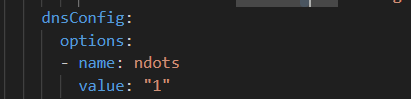
Redeployed and instantly cut the DNS traffic by about 90% — and reduced application latency as each DNS call no longer has to have fourteen failures before the final success.